
Full-Text Search#
Full-text search capabilities are implemented using Meilisearch. If enabled an indexer is running in the background indexing all files that enter the system through the Pub/Sub channels of the Streaming service. Already existing data can be indexed using the reindexing capabilities.
Architecture#
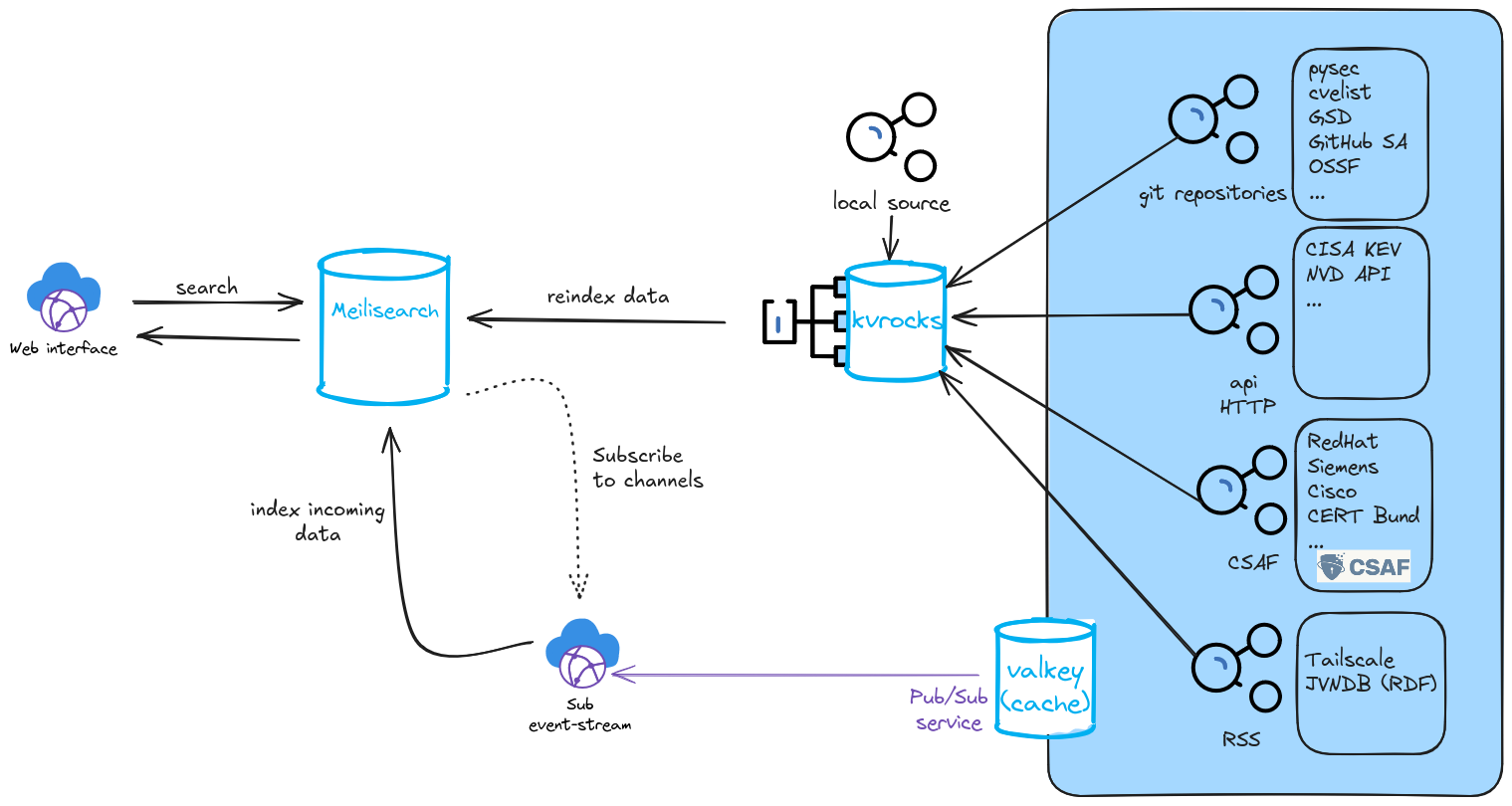
Setup#
To setup fulltextsearch a running Meilisearch instance is needed. In the following two ways are described to run them locally.
Running locally#
Download the latest stable release:
sudo apt-get update
sudo apt install curl -y
curl -L https://install.meilisearch.com | sh
Download config:
curl https://raw.githubusercontent.com/meilisearch/meilisearch/latest/config.toml > config.toml
Note
It is recommended to adjust the following fields in the config:
| env = "production"
| master_key = "<YOUR_MASTER_KEY>"
| db_path = "<YOUR_PATH>"
| dump_dir = "<YOUR_PATH>"
| snapshot_dir = "<YOUR_PATH>"
| no_analytics = true
Run the binary:
./meilisearch --config-file-path="./config.toml"
Running with Systemd#
Download the latest stable release:
sudo apt-get update
sudo apt install curl -y
curl -L https://install.meilisearch.com | sh
mv ./meilisearch /usr/local/bin/
Create User for Meilisearch:
useradd -d /var/lib/meilisearch -s /bin/false -m -r meilisearch
chown meilisearch:meilisearch /usr/local/bin/meilisearch
Create configuration file:
mkdir /var/lib/meilisearch/data /var/lib/meilisearch/dumps /var/lib/meilisearch/snapshots
chown -R meilisearch:meilisearch /var/lib/meilisearch
chmod 750 /var/lib/meilisearch
curl https://raw.githubusercontent.com/meilisearch/meilisearch/latest/config.toml > /etc/meilisearch.toml
Note
Adjust the following fields in the config:
| env = "production"
| master_key = "<YOUR_MASTER_KEY>"
| db_path = "/var/lib/meilisearch/data"
| dump_dir = "/var/lib/meilisearch/dumps"
| snapshot_dir = "/var/lib/meilisearch/snapshots"
| no_analytics = true
Register Meilisearch as a service:
cat << EOF > /etc/systemd/system/meilisearch.service
[Unit]
Description=Meilisearch
After=systemd-user-sessions.service

[Service]
Type=simple
WorkingDirectory=/var/lib/meilisearch
ExecStart=/usr/local/bin/meilisearch --config-file-path /etc/meilisearch.toml
User=meilisearch
Group=meilisearch
Restart=on-failure

[Install]
WantedBy=multi-user.target
EOF

systemctl enable meilisearch
systemctl start meilisearch
Verify the service is running:
systemctl status meilisearch
Configuration#
To enable fulltext-search set fulltextsearch: true in config/generic.json.
The configuration for Meilisearch is located in the config/fulltextsearch.json file.
{
  "MEILI_URL": "http://10.61.32.227:7700",
  "MEILI_ADMIN_API_KEY": "",
  "MEILI_API_KEY": "",
  "MEILI_MASTER_API_KEY": "",
  "MEILI_MAX_HITS": 10000,
  "MEILI_ORDERED_SEARCH_CAP": 10000,
  "VALKEY_HOST": "127.0.0.1",
  "VALKEY_PORT": "10002",
  "_notes": {
    "MEILI_URL": "",
    "MEILI_ADMIN_API_KEY": "Meilisearch admin key that can be used to alter data",
    "MEILI_API_KEY": "Meilisearch API key that can be used to search data",
    "MEILI_MASTER_API_KEY": "Meilisearch master key used to manage keys",
    "MEILI_MAX_HITS": "Maximum number of hits ONE index can return for ONE search request",
    "MEILI_ORDERED_SEARCH_CAP": "Total Maximum number of hits that is considered when reordering the elements for a search request e.g. based on publishing date",
    "VALKEY_HOST": "IP address of the valkey host used by vulnerability-lookup",
    "VALKEY_PORT": "Port of the valkey host"
  }

}
Note
If you do not have a dedicated search and/or admin API key for your Meilisearch instance you can get one through the Meilisearch API
Logging#
The Indexer will run in the background and log its output to /logs/index_fulltext_warning.log.
Indexes#
Meilisearch stores documents inside indexes. In vulnerability-lookup the data model is simple:
One index per source: each upstream source (e.g., CVE feed, advisory feed, etc.) is stored in its own Meilisearch index.
Exceptions (CSAF and CERT-FR): these feeds are handled as aggregated indexes
Indexing existing data#
Note
Depending on the number of files inside your vulnerability-lookup instance, reindexing will take a substantial amount of time.
Update Data in indexes:
cd vulnerability-lookup
poetry run python ./bin/index_fulltext.py --reindex --topics <comma_seperated_list_of_topics>
Recreate indexes (delete existing ones):
cd vulnerability-lookup
poetry run python ./bin/index_fulltext.py --reindex --delete --topics <comma_sepereated_list_of_topics>
Searching#
Enabling fulltextsearch in the generic.json will add an additional field to the search view:
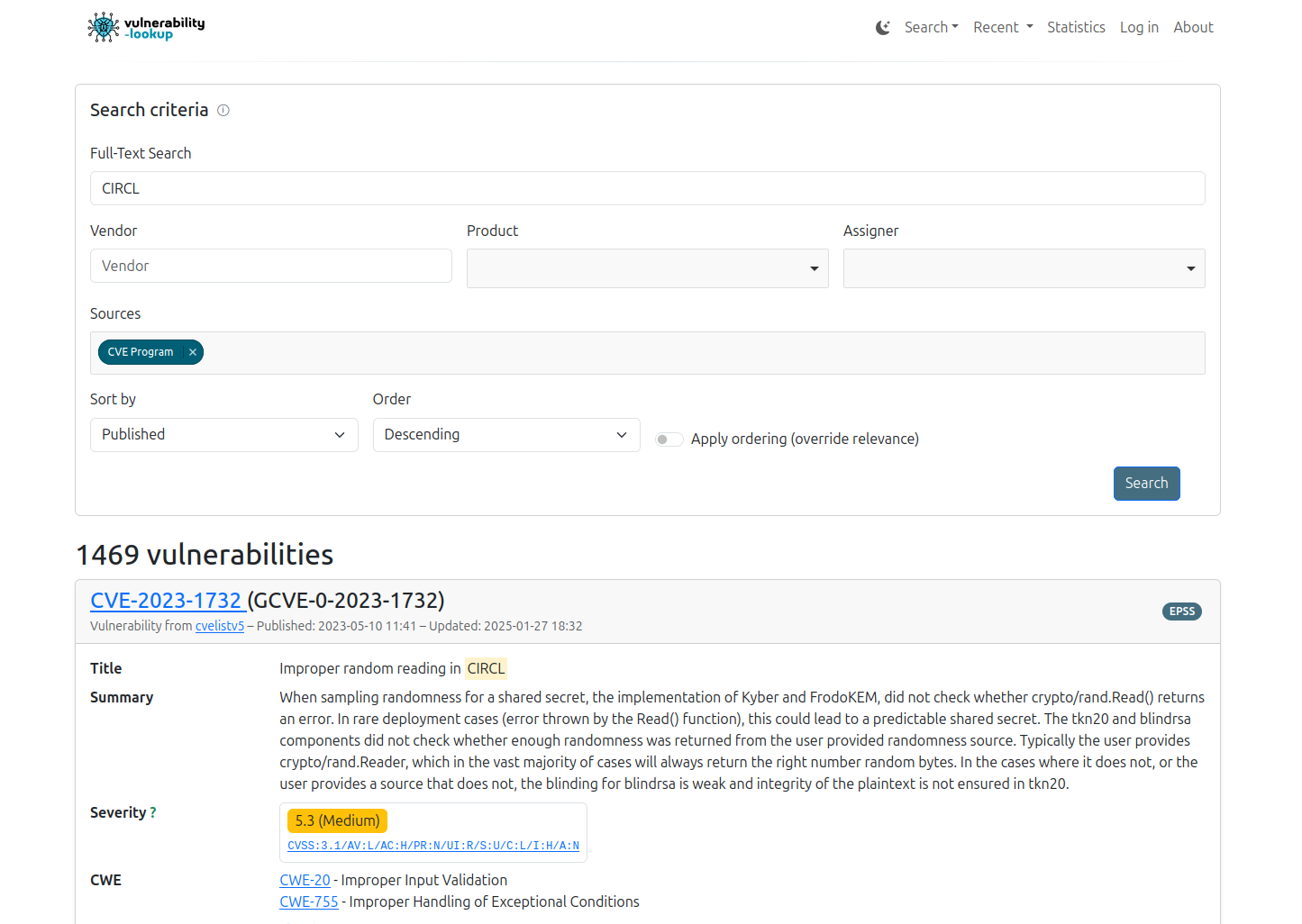
The full-text query supports phrase searches using double quotes. Quoted queries try to match the exact string (as a contiguous phrase) which is useful when searching for structured substrings inside JSON fields (e.g., CVSS vectors).
Examples:
Search for an exact CVSS metric fragment:
"AV:L"Search for a specific identifier/token:
"CVE-2025-1234"
Note
By default the results from the Fulltext-search will be ordered by relevance according to the Meilisearch Relevancy Ranking. This ordering can be overridden with the corresponding button on the bottom right.